- 授权协议: MIT
- 开发语言: PHP HTML/CSS
- 操作系统: 跨平台
- 软件首页: https://github.com/johnlui/LaraDuoshuo
- 软件文档: https://github.com/johnlui/LaraDuoshuo/blob/master/readme.md
- 官方下载: https://github.com/johnlui/LaraDuoshuo
软件介绍
LaraDuoshuo
多说已经于 2017 年 6 月 1 号关闭,此为我即兴写的私有评论系统,初步设计用于 Hexo,下一步准备支持煎蛋那样的单页面多评论需求。
live demo
特性
多说数据导入功能
新评论邮件通知,被回复邮件通知
基于简单 @ 的回复功能
“审核后才显示”开关
域名白名单
基于 Akismet 的反垃圾评论
管理后台:评论审核、编辑
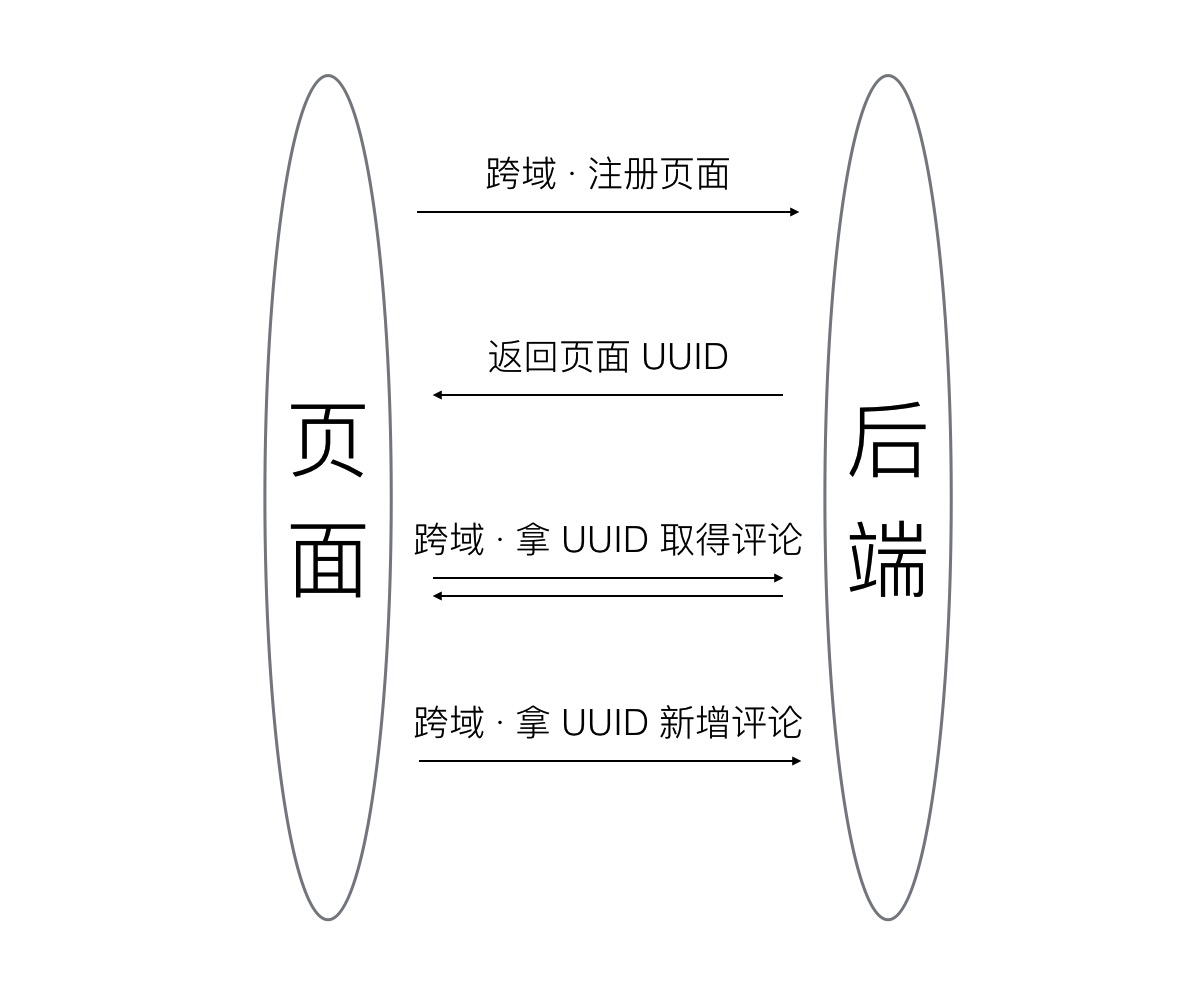
页面自注册
跨域部署,异步加载
移动兼容
环境要求
PHP > 5.6.4
图片们
原理图
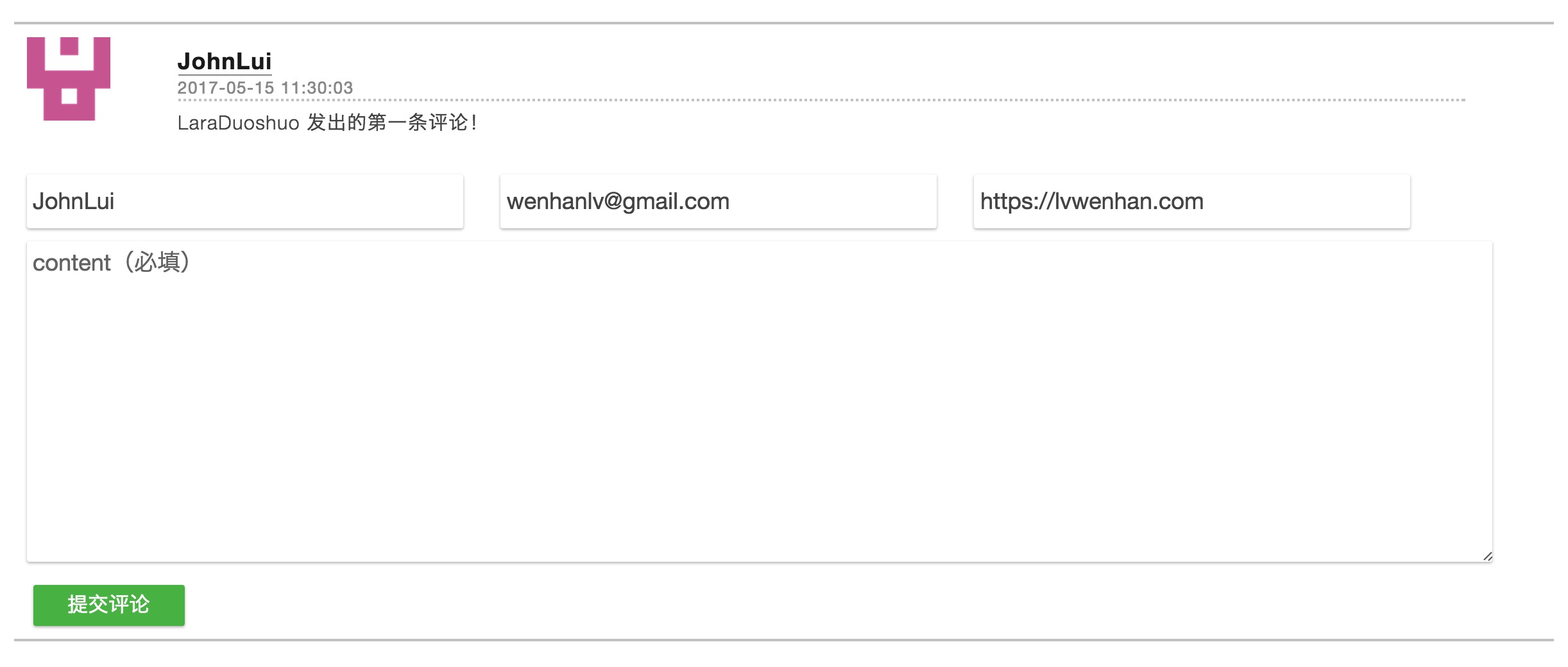
截图
如何激活附带的 demo
后端跑起来
生成 .env 文件和密钥:
git clone git@github.com:johnlui/LaraDuoshuo.git
cd LaraDuoshuo
composer update
sudo chmod -R 777 storage/ bootstrap/cache/
cp .env.example .env
php artisan key:generate
cd public
php -S 0.0.0.0:9000
然后将数据库配置修改为真实值,并将根目录下的 LaraDuoshuo.sql 导入数据库。
demo 跑起来
npm install hexo-cli -g
cd hexo-demo
hexo serve
如何用于 Hexo
后端
将代码部署到自己的服务器,指一个域名过去即可。
前端
Hexo 默认主题
在 themes/landscape/layout/_partial/article.ejs 第 36 行 </article> 的后面添加如下代码:
<% if (!index) { -%>
<link rel="stylesheet" href="//fuck.io:9000/css/static.css">
<div id="comments"></div>
<% } -%>
将 themes/landscape/layout/_partial/after-footer.ejs 第 17 行 <script src="//ajax.googleapis.com/ajax/libs/jquery/2.0.3/jquery.min.js"></script> 替换为:
<script src="//apps.bdimg.com/libs/jquery/2.1.1/jquery.min.js"></script>
<script src="//fuck.io:9000/js/static.js"></script>
<script>
LaraDuoshuo.APP_KEY = 'base64:nMYxR20sgL9zbiRrMS8GekiVzPSLBId9QAoTepx+nuk=';
LaraDuoshuo.BaseURL = 'http://fuck.io:9000';
</script>
请将上面的 LaraDuoshuo.APP_KEY 的值替换为你服务端 .env 中的 APP_KEY 的值。
著名的 NexT 主题
在 themes/next/layout/_layout.swig 中 {% if page.comments %} 这一行的下面增加:
<link rel="stylesheet" href="//fuck.io:9000/css/static.css">
<div id="comments"></div>
在 <script type="text/javascript" src="//cdn.bootcss.com/jquery/2.1.3/jquery.min.js"></script> 这一行的下面增加:
<script src="//fuck.io:9000/js/static.js"></script>
<script>
LaraDuoshuo.APP_KEY = 'base64:nMYxR20sgL9zbiRrMS8GekiVzPSLBId9QAoTepx+nuk=';
LaraDuoshuo.BaseURL = 'http://fuck.io:9000';
</script>
同样,请将上面的 LaraDuoshuo.APP_KEY 的值替换为你服务端 .env 中的 APP_KEY 的值。
替换域名
别忘了将上文中的 fuck.io:9000 替换为你真实的域名端口。
如何用于自己的静态页面
代码如下:
<link rel="stylesheet" href="//fuck.io:9000/css/static.css"> // 默认样式
<div id="comments"></div> // 评论 DOM 锚点

<script src="//apps.bdimg.com/libs/jquery/2.1.1/jquery.min.js"></script>
<script src="//fuck.io:9000/js/static.js"></script> // 此 js 必须在 jQuery 之后引入,否则会被覆盖
<script> // 注入基础参数
LaraDuoshuo.APP_KEY = 'base64:nMYxR20sgL9zbiRrMS8GekiVzPSLBId9QAoTepx+nuk=';
LaraDuoshuo.BaseURL = 'http://fuck.io:9000';
</script>
其他配置
域名白名单
修改 config/app.php 内的 domain_white_list 字段,将允许使用本系统的域名加入进去即可。注意那里还有一个开关,默认是不验证的呦。
Akismet 反垃圾评论
到 https://akismet.com 注册一个账户,得到一个“AKISMET API KEY”,配置到 config/app.php 内的 AKISMET_API_KEY字段,就 OK 啦!
管理后台
访问 /register 注册一个账号,成功之后将 config/app.php 内的 register_enable 字段改为 false 关闭注册。
之后就可以使用简洁高效的管理后台啦~
审核通过才显示
此配置位于 config/app.php 内,名为 force_show_after_check,默认为打开状态。
开源协议
本项目遵循 MIT 协议开源,具体请查看根目录下的 LICENSE 文件。


CSS 压缩/解压工具
在线压缩/解压 CSS 代码

HTML 编码/解码
HTML 编码/解码
