- 授权协议: Apache
- 开发语言: Java
- 操作系统: 跨平台
- 软件首页: http://travis-ci.org/
- 软件文档: https://github.com/nukc/how-to-use-travis-ci/blob/master/README.md
- 官方下载: https://github.com/nukc/how-to-use-travis-ci/archive/master.zip
软件介绍
如何简单入门使用Travis-CI持续集成
不知道你们有没有看过
Travis-CI 是什么?
Travis-CI是一个开源的持续构建项目,能够测试和部署;Travis-CI会同步你在GitHub上托管的项目,每当你Commit Push之后,就会在几分钟内开始按照你的要求测试部署你的项目。
目前Travis-CI分http://travis-ci.org/(GitHub公开项目进这个)和http://travis-ci.com/(私有付费项目)
官方文档:https://docs.travis-ci.com/
开始使用 Travis-CI
1:用你的GitHub账号登录Travis-CI,确认接受访问GitHub的权限。
2:登录之后,Travis-CI就会同步你GitHub账号的仓库。然后打开个人页面并给你想要构建的项目启用Travis-CI。
就像这样:

3:添加 .travis.yml 文件到你项目根目录下,Travis-CI会按照.travis.yml里的内容进行构建。
如下是一个Android项目配置例子:
language: android
android:
  components:
    # Uncomment the lines below if you want to
    # use the latest revision of Android SDK Tools
    # - platform-tools
    # - tools

    # The BuildTools version used by your project
    - build-tools-19.1.0

    # The SDK version used to compile your project
    - android-19

    # Additional components
    - extra-google-google_play_services
    - extra-google-m2repository
    - extra-android-m2repository
    - addon-google_apis-google-19

    # Specify at least one system image,
    # if you need to run emulator(s) during your tests
    - sys-img-armeabi-v7a-android-19
    - sys-img-x86-android-17
4:把 .travis.yml push到你的GitHub上以触发Travis-CI进行构建。
5:最后你就可以到构建状态页面来查看你的项目是否构建成功。

配置构建脚本
由于我也是刚入门不久,所以我只能讲解一些基础用法,如果有其他需求,大家可以自己慢慢探索。
先来看看下面这个我使用过的配置:
language: android   # 声明构建语言环境

notifications:      # 每次构建的时候是否通知,如果不想收到通知邮箱(个人感觉邮件贼烦),那就设置false吧
  email: false

sudo: false         # 开启基于容器的Travis CI任务,让编译效率更高。

android:            # 配置信息
  components:
    - tools
    - build-tools-23.0.2
    - android-23
    - extra-android-m2repository     # Android Support Repository
    - extra-android-support          # Support Library

before_install:
 - chmod +x gradlew  # 改变gradlew的访问权限

script:              # 执行:下面的命令
  - ./gradlew assembleRelease

before_deploy:       # 部署之前
  # 使用 mv 命令进行修改apk文件的名字
  - mv app/build/outputs/apk/app-release.apk app/build/outputs/apk/buff.apk

deploy:              # 部署
  provider: releases # 部署到GitHub Release,除此之外,Travis CI还支持发布到fir.im、AWS、Google App Engine等
  api_key:           # 填写GitHub的token (Settings -> Personal access tokens -> Generate new token)
    secure: 7f4dc45a19f742dce39cbe4d1e5852xxxxxxxxx
  file: app/build/outputs/apk/buff.apk   # 部署文件路径
  skip_cleanup: true     # 设置为true以跳过清理,不然apk文件就会被清理
  on:     # 发布时机
    tags: true       # tags设置为true表示只有在有tag的情况下才部署
除了上面这些命令外,还有很多,比如:branches: (指定持续集成的分支), install:(安装软件包)等待,
如果想进一步了解请到Customizing Your Build
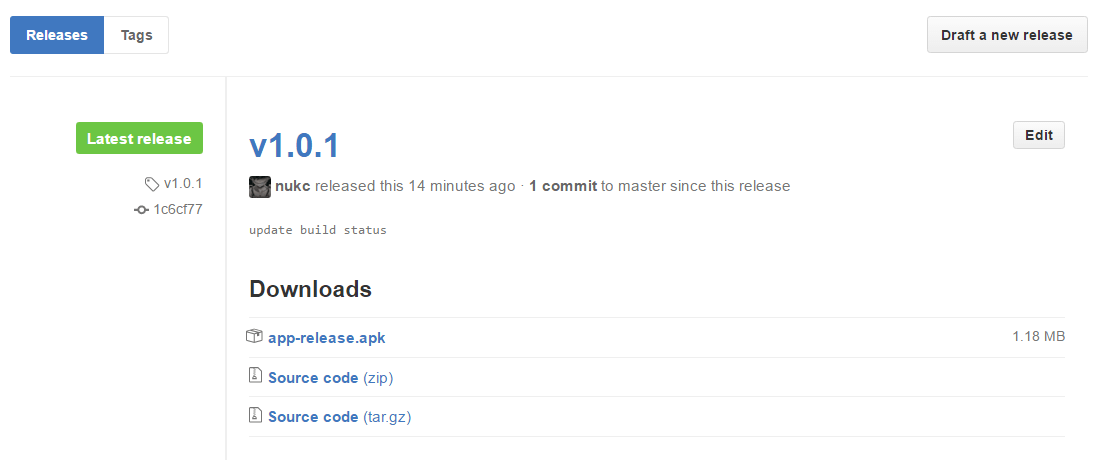
自动发布到GitHub Release:
密码和证书安全
对于密码等敏感信息,Travis CI提供了2种解决方案:
对密码等敏感信息进行加密,然后再构建环境时解密。
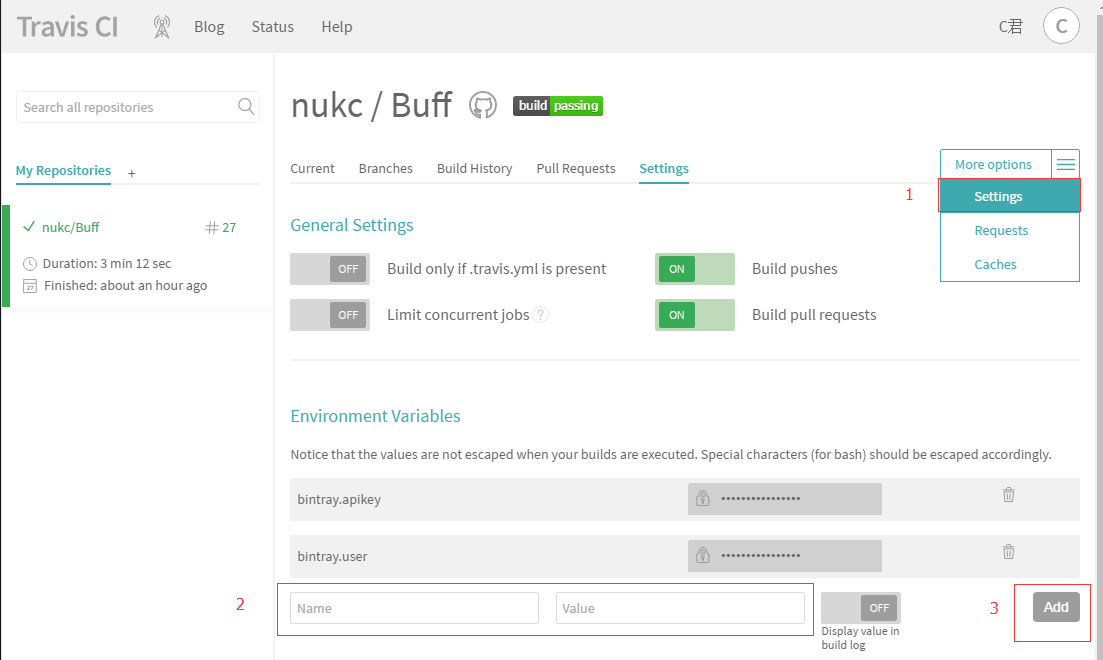
在Travis CI控制台设置环境变量,然后使用
System.getenv()获取值。
考虑到安全问题,我们的签名设置可能是这样的:
release {
    try {
        storeFile file("nukc.jks")
        storePassword KEYSTORE_PASSWORD
        keyAlias "C"
        keyPassword KEY_PASSWORD
    } catch (ex) {
        throw new Exception("You should define KEYSTORE_PASSWORD and KEY_PASSWORD in gradle.properties.")
    }
}
KEYSTORE_PASSWORD和KEY_PASSWORD环境变量放在了gradle.properties文件,可以直接在build.gradle中使用 如果不知道是否能获取到gradle.properties里的环境变量,那就加个判断吧。(设置了会获取不到?比如.gitignore设置了忽略没有上传,判断一下也好) 然后最终就变成这样:
release {
    try {
        storeFile file("nukc.jks")
        storePassword project.hasProperty("KEYSTORE_PASSWORD") ? KEYSTORE_PASSWORD : System.getenv("KEYSTORE_PASSWORD")
        keyAlias "C"
        keyPassword project.hasProperty("KEY_PASSWORD") ? KEY_PASSWORD : System.getenv("KEY_PASSWORD")
    } catch (ex) {
        throw new Exception("You should define KEYSTORE_PASSWORD and KEY_PASSWORD in gradle.properties.")
    }
}
对于文件加密,Travis CI提供了一个基于ruby的CLI命令行工具,可以直接使用gem安装:
gem install travis
安装后进入安卓项目根目录,尝试对证书文件加密:
travis encrypt-file nukc.jks --add
如果首次运行,travis会提示需要登录,运行travis login --org并输入Github用户名密码即可。(付费版则为travis login --pro)
travis encrypt-file指令会做几件事情:
在Travis CI控制台自动生成一对密钥: encrypted_e6c55137b621_key和encrypted_e6c55137b621_iv
基于密钥通过openssl对文件进行加密,上例中会项目根目录生成xx.jks.enc文件
在.travis.yml中自动生成Travis CI环境下解密文件的配置,上例运行后可以看到.travis.yml中多了几行:
before_install:
    - gem install fir-cli
    - openssl aes-256-cbc -K $encrypted_e6c55137b621_key -iv $encrypted_e6c55137b621_iv
      -in nukc.jks.enc -out nukc.jks -d
最后在.gitignore中忽略xx.jks以及gradle.properties
项目使用了Bintray配置文件
目前我的开源项目用不到证书签名,我还是比较关心Bintray apikey的安全,上传到JCenter还是比较实用的。
本来我把bintray.apikey和bintray.user设置在了local.properties中,但由于local.properties不会被上传,
Travis CI无法获取到,那肯定是会build failing的。
之前:(报错,没有local.properties这样的文件)
Properties properties = new Properties()
properties.load(project.rootProject.file('local.properties').newDataInputStream())
bintray {
    user = properties.getProperty("bintray.user")
    key = properties.getProperty("bintray.apikey")
    configurations = ['archives']
    pkg {
        repo = "maven"
        name = "Buff"
        websiteUrl = siteUrl
        vcsUrl = gitUrl
        licenses = ["MIT"]
        publish = true
    }
}
然后我把这2个变量添加到了Travis CI控制台,最后改一下。
Properties properties = new Properties()
boolean isHasFile = false
if (project.rootProject.findProject('local.properties') != null){
    isHasFile = true
    properties.load(project.rootProject.file('local.properties').newDataInputStream())
}
bintray {
    user = isHasFile ? properties.getProperty("bintray.user") : System.getenv("bintray.user")
    key = isHasFile ? properties.getProperty("bintray.apikey") : System.getenv("bintray.apikey")
    configurations = ['archives']
    pkg {
        repo = "maven"
        name = "Buff"
        websiteUrl = siteUrl
        vcsUrl = gitUrl
        licenses = ["MIT"]
        publish = true
    }
}
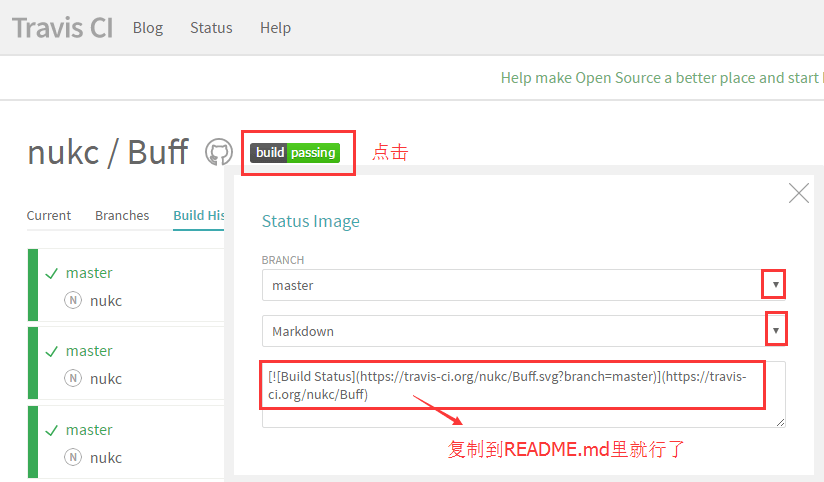
如何在自己的项目中显示Status Image
爬过的坑
如果你遇到了其他的问题,可以尝试到travis-ci/issues里找找,或者Google / StackOverflow
/home/travis/build.sh: line 45: ./gradlew: Permission denied
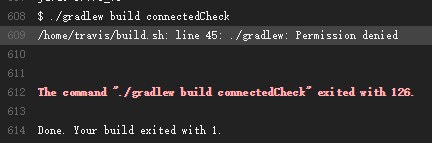
gradlew的权限问题,修改gradlew的权限,在.travis.yml里加上:
before_install:
 - chmod +x gradlew
failed to find Build Tools revision 23.0.2

我是加上 - tools 解决的:
android:
  components:
    - tools
failed to deploy

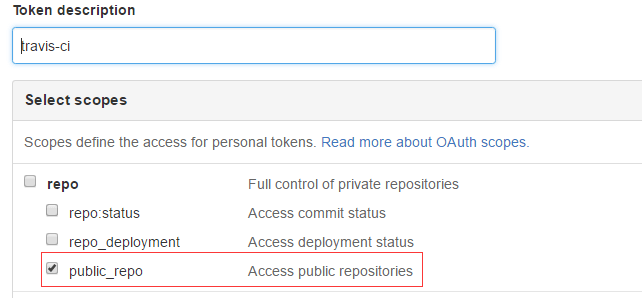
设置一下这个token的权限就好了
最后,希望大家都能顺顺利利的build passing。


