内容简介:TypeScript 4.4 已正式发布,开发者可通过 NuGet 或以下 npm 命令进行获取: npm install typescript 部分更新亮点: 提供针对 Aliased Conditions 的控制流分析 (Control Flow Analysis) 增加 symbol 类型和模...
TypeScript 4.4 已正式发布,开发者可通过 NuGet 或以下 npm 命令进行获取:
npm install typescript
部分更新亮点:
- 提供针对 Aliased Conditions 的控制流分析 (Control Flow Analysis)
- 增加 symbol 类型和模板字符串模式的索引签名
- 在 Catch 中的变量默认为
unknown(--useUnknownInCatchVariables) - 新增 Exact Optional Property 类型 (
--exactOptionalPropertyTypes) - Class
staticBlocks - 针对
tsc --help的升级和改进 - 优化性能
- 针对 JavaScript 的拼写检查
- Inlay Hints
- 破坏性变化
提供针对 Aliased Conditions 的控制流分析 (Control Flow Analysis)
例子,Before typescript 4.4
function foo(arg: unknown) {
  if (typeof arg === 'string') {
    // We know this is a string now.
    console.log(arg.toUpperCase())
  }
}
function foo(arg: unknown) {
  const argIsString = typeof arg === 'string'
  if (argIsString) {
    console.log(arg.toUpperCase())
    //              ~~~~~~~~~~~
    // Error! Property 'toUpperCase' does not exist on type 'unknown'.
  }
}
In TypeScript 4.4
function foo(arg: unknown) {
  const argIsString = typeof arg === 'string'
  if (argIsString) {
    console.log(arg.toUpperCase())
    // works just fine
  }
}
可以看到,在 TypeScript 4.4 中增加了 typeof 检查,并保留了不同类型的类型保护条件。
增加 symbol 类型和模板字符串模式的索引签名
Before typescript 4.4
interface Foo {
  name: string
  [index: number]: unknown
  // ...
}
interface Bar {
  [index: string]: unknown
  // ...
}
// 只支持 string 和 number
In TypeScript 4.4
现在支持索引签名类型有
stringnumbersymbol- template string patterns (e.g.
hello-${string})
interface Foo {
  [index: number]: number;
  [k: `hello-${string}`]: unknown;
  // ...
}
const a: Foo = {
  32: 233,
  'hello-name': 'xxx'
  // correct
  helloname: 0,
  // error!
}
在 Catch 中的变量默认为 unknown
从 TypeScript 4.0 开始就可以给 catch 中变量显式声明类型,通常声明为unknown是最好的做法。现在 TypeScript 4.4 默认设置为 unkown。
try {
    executeSomeThirdPartyCode();
}
catch (err) { // err: unknown

    // Error! Property 'message' does not exist on type 'unknown'.
    console.error(err.message);

    // Works! We can narrow 'err' from 'unknown' to 'Error'.
    if (err instanceof Error) {
        console.error(err.message);
    }
}
如需开启此特性,打开 TypeScript 的 strict 模式。
新增 Exact Optional Property 类型
Before typescript 4.4
interface Person {
  name: string
  age?: number
}
// 等价于
interface Person {
  name: string
  age?: number | undefined
}
const p: Person = {
  name: 'Daniel',
  age: undefined, // This is okay by default.
}
默认情况下,TypeScript不区分值为 undefined 的存在属性和缺失属性。 虽然这在大多数情况下都有效,但并非所有 JavaScript 代码都做出相同的假设。 Object.assign 、 Object.keys 、对象展开 ({ ...obj }) 和 for-in 循环等函数和运算符的行为取决于对象上是否实际存在属性。
In TypeScript 4.4
在 TypeScript 4.4 中,新标志--exactOptionalPropertyTypes指定可选属性类型应完全按照书面解释,这意味着| undefined不会被添加到类型中:
// With 'exactOptionalPropertyTypes' on:
const p: Person = {
    name: "Daniel",
    age: undefined, // Error! undefined isn't a number
};
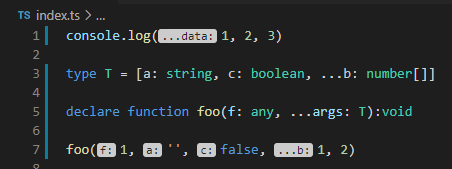
实验性的 Inlay 提示
TypeScript 正在测试编辑器对 inlay 文本的支持,这有助于在代码中内联显示有用的信息,例如参数名称。可以将其视为一种友好的“幽灵文本 (ghost text)”。
添加针对 JavaScript 的拼写建议
export var inModule = 1
inmodule.toFixed() // errors on exports

function f() {
    var locals = 2
    locale.toFixed() // errors on locals
}
var object = {
    spaaace: 3
}
object.spaaaace // error on read
object.spaace = 2 // error on write
object.fresh = 12 // OK, no spelling correction to offer
关于此功能的详细信息查看此 PR。
详情查看 发布公告。
以上就是本文的全部内容,希望本文的内容对大家的学习或者工作能带来一定的帮助,也希望大家多多支持 码农网
猜你喜欢:
- NPM包(模块)发布、更新、撤销发布
- 有赞灰度发布与蓝绿发布实践
- 【重磅发布】Linkis 0.10.0 版本发布
- BeetlSQL 3.0.9 发布,Idea 插件发布
- 贝密游戏 0.7.0 发布,发布斗地主
- 【重磅发布】DataSphere Studio 0.9.0 版本发布
本站部分资源来源于网络,本站转载出于传递更多信息之目的,版权归原作者或者来源机构所有,如转载稿涉及版权问题,请联系我们。


