内容简介:NFS架构下使用realpath_turbo优化php性能
生产系统架构图

程序和数据大概500G,存放在一台ECS上,开启了NFS共享给若干台Nginx服务器进行读写,包括共享session也存于NFS分区。数据下一步准备迁移到OSS.
在系统运行中发现NFS的读写效率较低,调节NFS的缓存参数也无改善。例如通过记录php慢日志,看到大量session_start执行很慢:

于是将session存储方式由文件改为redis,得以解决。
在google搜索NFS+session_start的过程中,发现了一篇老外的神贴:
文中提到了在NFS下面php的性能问题:由于php程序中需要使用大量的require和include,导致出现大量lstat系统调用,大大降低程序性能。虽然没有明确阐述,但我理解,NFS下这个问题会比较明显。立即在生产系统中采用strace命令进行统计分析:
#通过strace跟踪php-fpm详细的lstat调用规律
#pgrep用法:
#-n匹配最新(最近生成的)符合所有其它匹配条件的进程
#-o匹配最旧(最早生成的)符合所有其它匹配条件的进程
strace -c -p $(pgrep -n php-fpm)
果然看到 lstat 占比排第一(由于现在生产系统已经调优,无法再捕获结果,参考上述文档)
通常调优这个问题可以通过在php.ini(或php-fpm.conf)修改realpath_cache_size和realpath_cache_ttl这两个参数即可:

realpath_cache_size: php进程所使用的真实路径缓冲区的大小,默认16K
realpath_cache_ttl: 缓存时间,默认120秒
将以上两个参数适当加大,即可减少lstat的调用次数。
但是当php设置了open_basedir或者开启了safe_mode时,这两个参数将不再生效,见 http://bugs.php.net/bug.php?id=52312
open_basedir的作用是限制php的读取目录,是必要的安全设置,当然不能取消。要想同时开启二者,就要引入大神的realpath_turbo模块了。github地址: https://github.com/Whissi/realpath_turbo
编译安装:
cd ~
wget https://github.com/Whissi/realpath_turbo/archive/master.zip -O realpath_turbo.zip
unzip realpath_turbo.zip
cd realpath_turbo-master/
/usr/local/php_5.3.29/bin/phpize
./configure --with-php-config=/usr/local/php_5.3.29/bin/php-config
make
make test NO_INTERACTION=1
make install

echo extension=realpath_turbo.so >> /usr/local/php_5.3.29/lib/php.ini
中间遇到一个编译错误:
/root/realpath_turbo-master/realpath_turbo.c: In function ‘zm_activate_realpath_turbo’:
/root/realpath_turbo-master/realpath_turbo.c:43: warning: initialization makes pointer from integer without a cast
/root/realpath_turbo-master/realpath_turbo.c:76: error: invalid type argument of ‘unary *’ (have ‘int’)
make: *** [realpath_turbo.lo] Error 1
打开realpath_turbo.c,去掉74-83行,这段是判断是否开了safe_mode,如果开了编译就不通过。因为没有开safe_mode,直接删掉。
由于使用了php-fpm,将模块的配置放到了php-fpm.conf中
php_value[open_basedir] = "" php_value[realpath_turbo.disable_dangerous_functions] = 1 php_value[realpath_turbo.open_basedir] = "/home1/wwwroot/public_html:/home1/tmp/:/home1/log/" php_value[realpath_cache_size] = 20m php_value[realpath_cache_ttl] = 3600 `` 重启php-fpm,在phpinfo中看到realpath_turbo模块已经加载。 再次进行strace,可以看到lstat已经不在占用最多时间,优化完成。 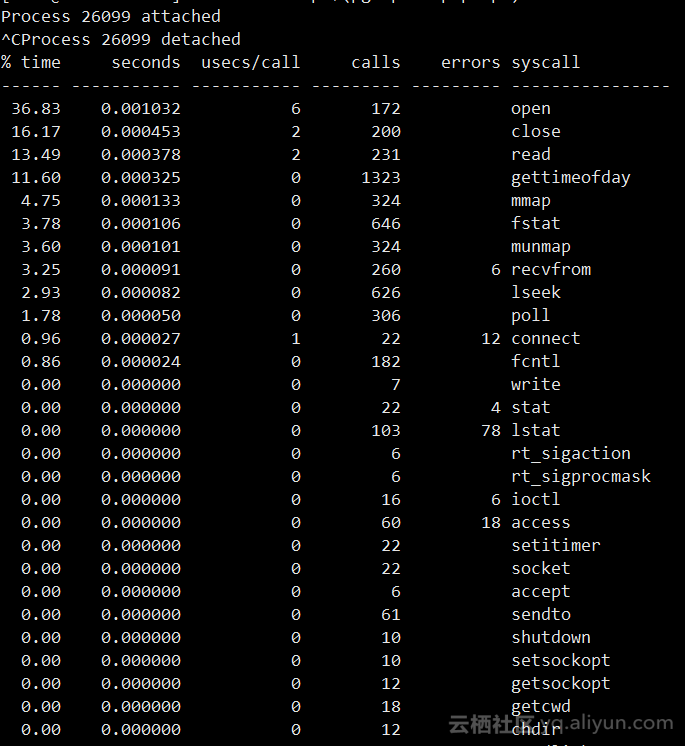
以上就是本文的全部内容,希望对大家的学习有所帮助,也希望大家多多支持 码农网
猜你喜欢:
- 性能测试流程5步走:BS架构和CS架构性能指标大对比
- 【架构入门 - 高性能篇】集群高性能
- 『互联网架构』软件架构-rocketmq之性能测试(63)
- 【架构入门 - 高性能篇】数据库高性能
- 高性能架构模式
- 入门架构——单机高性能
本站部分资源来源于网络,本站转载出于传递更多信息之目的,版权归原作者或者来源机构所有,如转载稿涉及版权问题,请联系我们。


