内容简介:As a Rails and Ruby lover, I often search for the gem that will perfectly cover my use case. When I need to solve a problem I'm having, I want to choose theRuby gems are extensive libraries created inside the Ruby community. The best place to find a ready
As a Rails and Ruby lover, I often search for the gem that will perfectly cover my use case. When I need to solve a problem I'm having, I want to choose the right one , the most suitable solution.
Ruby gems are extensive libraries created inside the Ruby community. The best place to find a ready solution for any task is the website rubygems.org , a public repository of gems that can be searched using the search box on the home page. RubyGems’ website is an efficient tool that facilitates the sharing and the installation of packages. But although its search bar is very helpful, I decided to create an alternative search bar more suited to our needs.
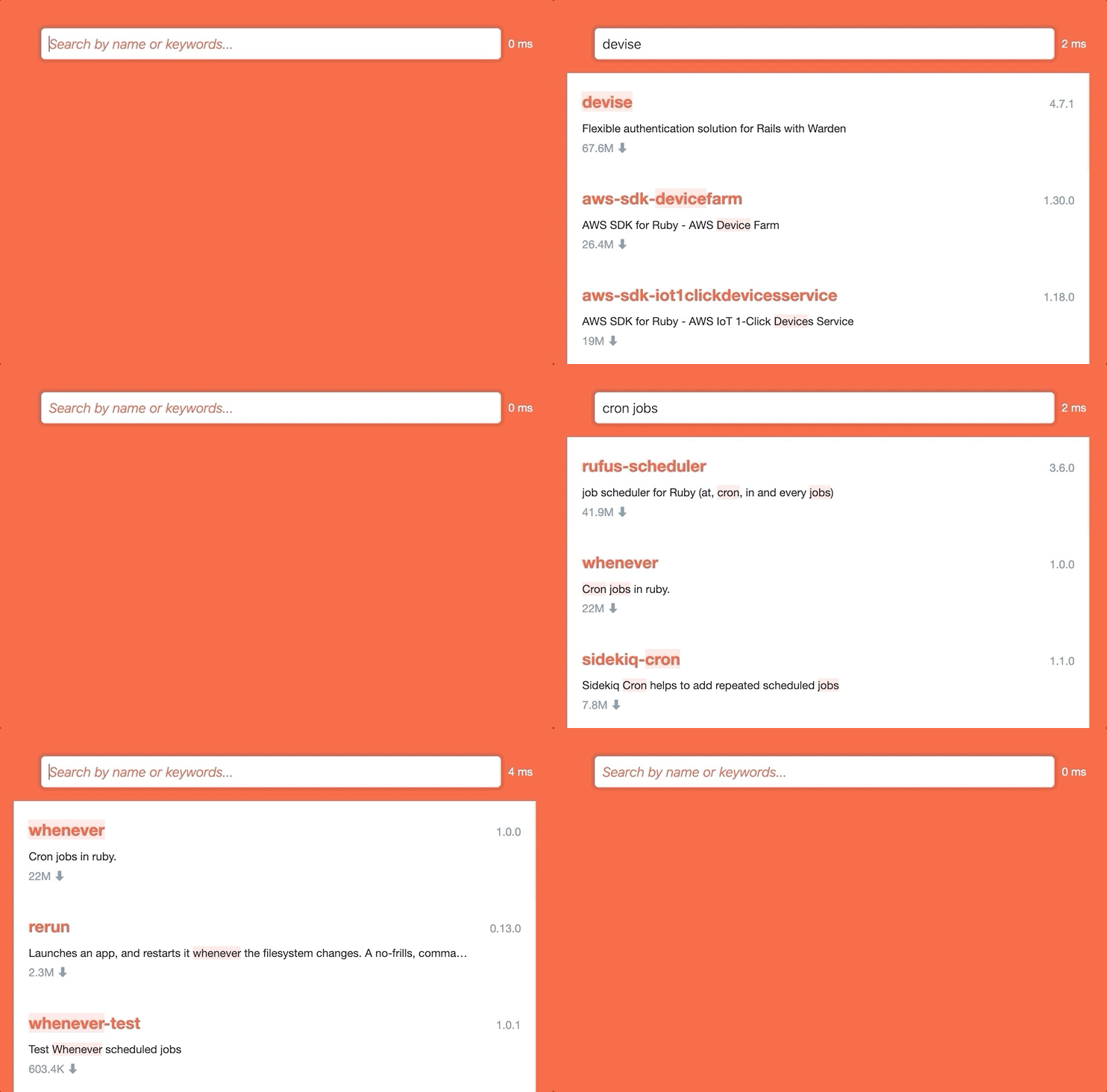
The search-as-you-type experience
First, I wanted to implement a search-as-you-type experience. Which means:
- a response time lower than 50 milliseconds
- presenting all matching results immediately under the search box while the user is typing and without them pressing enter
That is not yet the case in the RubyGems' website since a new page is loaded each time a request is made.
The relevancy
You can get relevant and accurate results by using the RubyGems' search bar, but most of the time only by performing an Advanced Search, which is not always convenient. You have to decide what to fill in the different sections. Are you going to search for a specific package by entering its name (e.g. "devise") or find a package whose summary would match a keyword (e.g. "deployment")?
However, despite this functionality, you may not find gems that meet your needs. For example, if you enter "pagination" you would expect to see the gem "kaminari", which is the most popular gem for pagination among the RoR community, showing up in the results. Here is the return we get from RubyGem's search bar when submitting the keyword "pagination". As you can see, "kaminari" doesn’t appear before the 9th result.
Even when refining the search , the first result to show is "kanimari-core" which is not exactly the more appropriate and famous "kaminari" package we would like to find, but it’s still better than nothing.
Then if we do a search containing a typo in the request , like "pagintion", the page is displayed without any result and suggests you a similar word for your next search.
After this experience as a user, I aimed to create a single search bar able to understand what you want and to instantly find it !
MeiliSearch checks all these points, and more!
I've never implemented a search engine; I've never even used one, except a basic Elasticsearch instance with no configuration for a proof of concept. For that reason, all I needed was an easy-to-setup tool, able to handle both speediness and relevancy at the same time. That's why MeiliSearch was a perfect fit for this project.
MeiliSearch is an ultra-relevant and fast search engine . In other words, it can return the most relevant results of your dataset under 50 ms, and therefore it gives a strong sense of immediacy.
Plus, without the need to configure anything, it handles search miss-spelling: i.e. Typos. Try to submit "devose" instead of "devise" and MeiliSearch will return "devise" as the first result.
Finally, MeiliSearch is open-source and integrates a simpleRESTful API . You can seamlessly communicate with the API using cURL or one of MeiliSearch's wrappers .
Creating the alternative search bar
All the gems data are available on the RubyGems' website as a PostgreSQL dump file and are updated daily. Thus, I wrote a Ruby script to download the latest dataset, parse the PostgreSQL dump file, and push all the data into my MeiliSearch instance. Of course, it uses the meilisearch-ruby wrapper to communicate with the API. This script is hosted in Heroku and runs every day thanks to the Heroku Scheduler.
About the MeiliSearch instance, at Meili we manage an internal Kubernetes cluster, which is a handy tool to host demos like this one. For curious readers who would like to find out more, MeiliSearch is quite easy to download and run by yourself (Homebrew, APT, Docker...).
Regarding HTML and CSS, I kept much of the original structure of the RubyGems' website. My intention was to develop a "search-as-you-type experience" in the same spirit as the original website. The front is deployed using GitHub Pages.
Easily improving the relevancy
Without having to set anything up, MeiliSearch returns pretty relevant results. Our search engine can quickly find the most suitable packages when inputting gem names like "devise" or "faraday". Unfortunately, for now it’s not always the case with keywords.
Let’s get back to my "pagination" example. If I run the search again without configuring anything, the first result to be displayed by MeiliSearch will be the Pagination gem. I don't see Kaminari at all in the results. That’s because by default, finding a document with a requested word in the title takes precedence over a document with a requested word in the description. Since there are many gems containing "pagination" in their title in the dataset, it explains why Kaminari does not appear at all.
I needed MeiliSearch to include the libraries popularity as well. In my dataset, the popularity of the Ruby gems is indicated by the number of downloads. I classified my gems in eight groups of fame (downloaded more than 50M times, more than 30M, and so forth) from 0
to 7
. The latter being considered as the most famous group.
I added this information to every document (i.e. gems) as a field named fame
. Then, I integrated this rule in MeiliSearch settings as a custom ranking rule.
Take a look at this snippet above. To put it simply, MeiliSearch will execute one by one all of these rules ( _sum_of_typos
, _number_of_words
...) and sort your documents following this sequence. When I add my custom rule, i.e. fame
in rankingOrder
and fame: 'dsc'
in rankingRules
, I'm in fact asking MeiliSearch to sort by fame in descendant order.
You might have noticed I have a second custom rule in the example: total_downloads
, so that my results will be sorted by the number of downloads. But since I chose to place this rule at the end of the list, meaning it was considered less important than the other ones, it will be the last one to be applied. The order of sequence definitely matters.
I'm not going to give further details about the MeiliSearch default ranking rules , even if it’s a particularly interesting topic. Describing how our search engine works deserves indeed a separate article of its own! :wink: Spoiler alert: MeiliSearch uses a bucket sort!
Now, if you type a global keyword like "pagination" you will find Kaminari in the first place; and if you try again with a less famous gem name like "pagy" for example you will still get the gem you expected! :tada:
MeiliSearch + you = :yellow_heart:
These minor settings were really easy to integrate, and your projects might require the same kind of behavior.
Here are some useful links if you want to get ready for your own MeiliSearch experience:
- thedocumentation
- the MeiliSearch's repository on GitHub: support Meili by starring it! :star:️
- the repository of this project
If you are interested in our project, how it works, or if you have any feedback, do not hesitate tocontact the team! :grin:
以上就是本文的全部内容,希望本文的内容对大家的学习或者工作能带来一定的帮助,也希望大家多多支持 码农网
猜你喜欢:
本站部分资源来源于网络,本站转载出于传递更多信息之目的,版权归原作者或者来源机构所有,如转载稿涉及版权问题,请联系我们。

JavaScript DOM高级程序设计
Jeffrey Sambells、Aaron Gustafson / 李松峰、李雅雯 / 人民邮电出版社 / 2008-7 / 59.00元
本书注重理论与实践的结合,全面讲述高级的DOM 脚本编程。全书分为3 个部分:第一部分“深入理解DOM 脚本编程”,涉及W3C DOM 规范的各方面,包括非标准的浏览器支持和不支持的内容;第二部分“浏览器外部通信”,以Ajax 和客户端—服务器端通信为主题;第三部分“部分高级脚本编程资源”,集中介绍了一批第三方脚本编程资源,包括库和API。同时,每部分的最后一章都为案例研究,将学到的内容应用于实践......一起来看看 《JavaScript DOM高级程序设计》 这本书的介绍吧!


